Class 1: Introduction and Setup
Time: 1 hour 20 min (40 min lecture + 40 min hands-on)
Goal: Understand the architecture well enough to predict tensor shapes, then get the published model running on your machine.
Part A: Lecture (40 min)
What is ASR?
Automatic Speech Recognition converts speech to text. Two kinds of variability make it hard:
- Acoustic: accents, background noise, microphone quality, speaking rate
- Linguistic: homophones ("to" vs "two"), punctuation, capitalization, names and numbers
Keep that split in mind; it is the most useful idea in this class. Almost every mistake a recognizer makes is either a hearing mistake (it misheard the sound) or a language mistake (it heard fine but chose the wrong word, spelling, or number format). The architecture below has one part for each skill, so when a transcript is wrong you can usually tell which part misfired. A mumbled name turned into a different word is the ear; "there" instead of "their" is the language model.
The classic answer was to train one big model end to end on thousands of hours of audio. Tiny Audio takes a cheaper route: borrow a model that already understands audio, borrow a model that already understands language, and train a small bridge between them.
The Architecture
Audio → Log-mel spectrogram → Encoder → Projector → Decoder → Text
        (preprocessing)       (frozen)  (trained)   (frozen + LoRA)
| Piece | Role | Job |
|---|---|---|
| Spectrogram | The picture | Turn raw sound into an image of which pitches are present when |
| Encoder | The ear | Work out which speech sounds were made, whoever said them |
| Projector | The translator | Hand what the ear heard to the language model in a form it reads |
| Decoder | The language expert | An ordinary chat-style language model that writes the transcript |
Log-mel spectrogram: a fixed recipe, nothing learned. See From Sound to a Spectrogram.
Encoder (Granite Speech 5.0 470M, ibm-granite/granite-speech-5.0-470m-turboctc-nc): a speech
encoder that turns audio features into one 1024-dimensional vector every 80 ms (12.5 frames per
second). It already knows what speech sounds like. We keep it frozen: its weights never change.
Projector (MLP): the bridge. It compresses the encoder's frames and maps them into the decoder's embedding space so they look like word embeddings. This is the one component we build from scratch.
Decoder (Qwen3.5-2B): a language model. Given the projected audio "tokens" and a short text prompt, it writes the transcript, handling spelling, punctuation, and grammar. Its own weights stay frozen; small LoRA adapters on every linear layer learn to read the projector's output.
Why This Works
| Component | Params | During training | Learning rate |
|---|---|---|---|
| Granite Speech encoder | ~473M | Frozen | none |
| MLP projector | ~12.6M | Trained from scratch | 1e-3 |
| Qwen3.5-2B decoder (+LoRA) | ~1.9B + ~67M | Base frozen, LoRA r=64 adapters | 1e-4 |
- The encoder was already trained for ASR, so its features carry nearly everything we need.
- The gap between "audio features" and "text embeddings" is narrow enough that a two-layer MLP can bridge it.
- The decoder's base weights never change, so Qwen3.5's language knowledge stays intact. The LoRA adapters (rank 64, alpha 64, on all linear layers) train at 1e-4, 10x below the projector, and learn the adjustment the decoder needs to read audio tokens. About 3% of the model trains.
The other variants are one flag away: training.use_lora=false trains the projector alone, and
training.freeze_language_model=false training.use_lora=false fully fine-tunes the decoder (far
more memory than the default sizing assumes; run ta runpod plan first).
From Sound to a Spectrogram
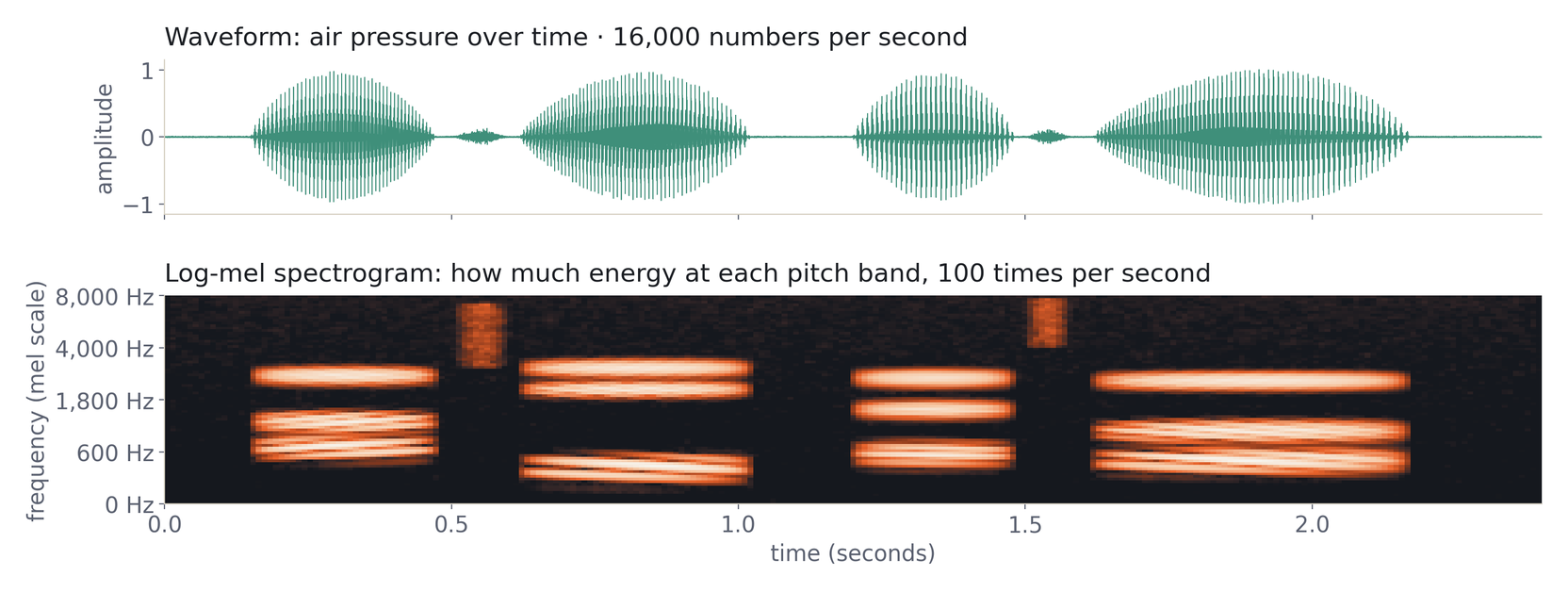
Sound is a wave of air pressure, and a digital recording is a long list of pressure readings: 16,000 of them per second at Tiny Audio's sample rate. That waveform (top) shows when someone talks, but what makes "ba" different from "da" is buried in wiggles far too fast to see, and too fast for a model to pick out of raw readings.
The log-mel spectrogram (bottom) asks, 100 times a second, how much energy there is at each pitch, low to high. Vowels become horizontal stripes, consonants become short, high, fuzzy smears, and each speech sound gets a visible signature. Two details make it "see like an ear":
- Mel spacing. The 128 frequency bands are spaced the way human hearing is: fine at low pitches, coarse at high ones.
- Log scale. Energies are compressed so loud vowels don't drown out soft consonants.
Nothing in this step is learned; it is the same fixed recipe for every clip. And a spectrogram is a grid of brightness values, time across and pitch up, which is exactly what a grayscale image is. That is no coincidence: speech models borrowed their tools from image models.
What the Encoder Produces
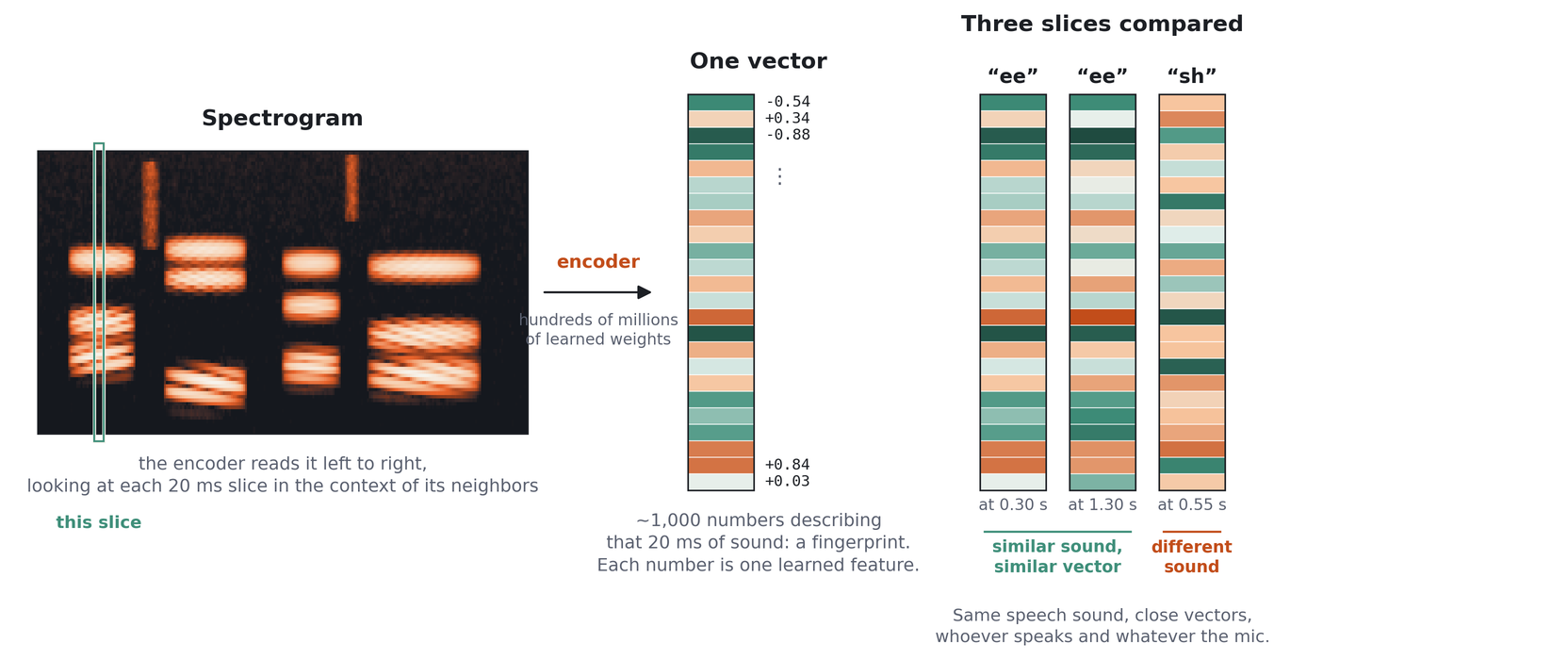
For every 80 ms slice (eight spectrogram frames), the Granite encoder emits one vector: a list of 1024 numbers. That length is the model's width: every layer inside the encoder reads a list of 1024 and writes a list of 1024, so the output vector is the model's working unit, not something bolted on at the end. (The picture shows a faster encoder that emits one vector per 20 ms; the idea is the same.)
No single number means anything on its own; the pattern across all 1024 is a fingerprint of that moment of sound. The useful property is in the right-hand panel: the same speech sound gets nearly the same vector whoever says it and whatever the microphone, while different sounds get different vectors. The encoder has learned to ignore who and how, and keep what.
Weights vs. Vectors
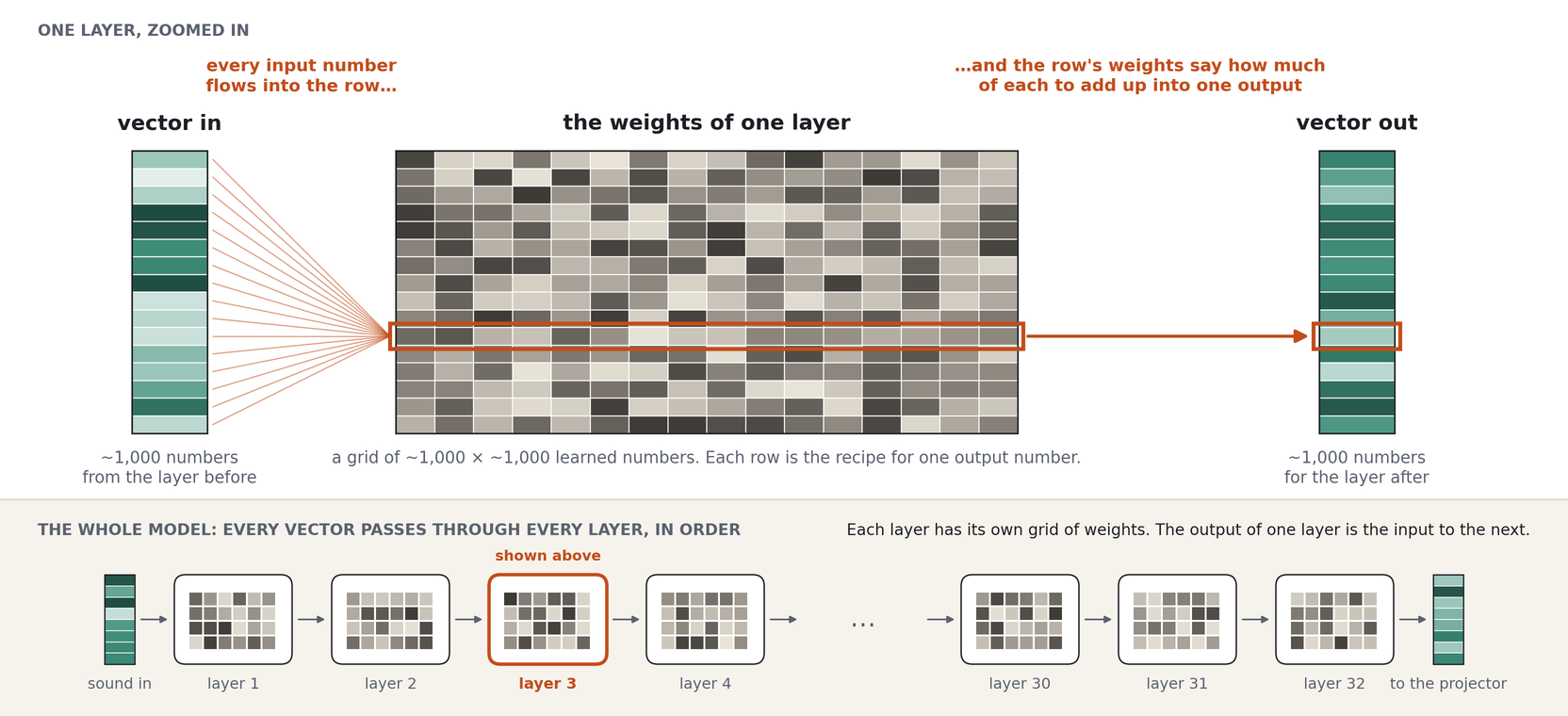
"473M parameters" and "1024-dimensional vectors" are different numbers, and it's worth being clear about why.
- A weight is a learned number. A layer holds grids of them, each roughly 1024 × 1024.
- Each row of a grid is a recipe. To make one output number, multiply every input number by the
weight in that row and add them up. Do that for every row and you have a new vector. This is the
matrix multiplication from high-school algebra, just enormous:
nn.Linearin PyTorch. - Layers stack. The encoder has 16 blocks, each with several grids. Every vector passes through all of them in order; the output of layer 1 is the input to layer 2.
One 1024 × 1024 grid is about 1M weights. Several grids per block, 16 blocks, and you reach hundreds of millions. The vectors stay 1024 numbers wide the whole way; there are just a lot of grids to pass through. Training is how weights get their values. Once trained (or frozen, like our encoder) they are the same for every clip. Weights stay; vectors flow.
How the Projector Works
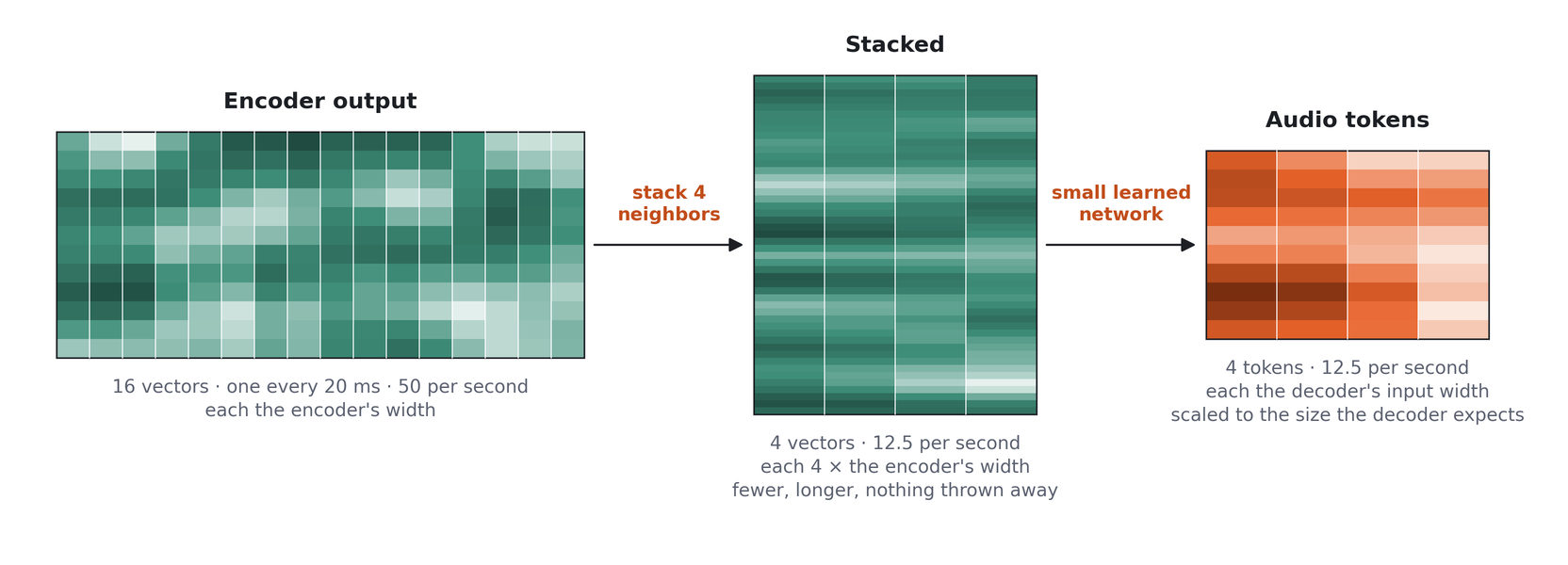
The encoder and decoder were trained separately, so their vectors don't match: different lengths (1024 vs 2048 in the default config) and different number ranges. The projector is the adapter. It reshapes each encoder vector to the decoder's width with a small learned network and scales it to the magnitude the decoder expects; with a faster encoder it also makes the sequence fewer by stacking neighbors, as the picture shows. Each resulting audio token covers about 80 ms of sound, roughly a syllable: not a word, not a letter, but a chunk of sound written in the decoder's language of numbers. Nobody designed what an audio token means; training settles on whatever packing helps the decoder write the right words.
With the default config, a 10-second clip flows through like this:
| Stage | Rate | Shape for 10 s | Notes |
|---|---|---|---|
| Waveform | 16,000 samples/s | 160,000 | Resampled to 16 kHz if needed |
| Encoder output | 12.5 frames/s | 125 × 1024 | Granite's conv layers subsample the features |
| Projector output | 12.5 tokens/s | 125 × 2048 | projector_pool_stride: 1, so no stacking |
That is about 12.6M parameters, and 2048 is Qwen3.5-2B's embedding size.
The default doesn't stack frames, because Granite already emits one frame per ~80 ms. Frame stacking
is easier to see with an encoder that runs faster, so the walkthrough below uses the earlier
GLM-ASR-Nano + Qwen3-0.6B pairing (50 encoder frames/s, k = 4). The idea is the same for any
encoder; only the numbers change.
| Stage | Rate | Shape for 10 s | Notes |
|---|---|---|---|
| Waveform | 16,000 samples/s | 160,000 | Resampled to 16 kHz if needed |
| Log-mel spectrogram | 100 frames/s | 128 × 1000 | 128 mel bins |
| Encoder output | 50 frames/s | 500 × 1280 | One conv layer halves the frame rate |
| After frame stacking (k = 4) | 12.5 tokens/s | 125 × 5120 | 4 adjacent frames concatenated |
| Projector output | 12.5 tokens/s | 125 × 1024 | Matches Qwen3-0.6B's embedding size |
The projector itself is:
Two ideas to remember:
- Frame stacking (downsampling). Concatenating
kadjacent frames along the feature axis cuts the sequence length bykand gives each token more context. The output length is:
With k = 4, 500 encoder frames become 125 audio tokens. Fewer tokens means the decoder does
less work and its attention sees a shorter sequence.
- Output scale. The last linear layer's output is multiplied by a fixed constant that is calibrated once, at model creation, so the projector's output has the same magnitude as Qwen3's word embeddings. Without it the audio tokens arrive about 13x too "loud" and the decoder's layers barely modify them.
Parameter count for that GLM-ASR + Qwen3-0.6B projector: about 5.2M in the first linear layer, about 1.05M in the second, plus a 5120-element norm. Roughly 6.3M total, against ~12.6M for the default.
How the Decoder Sees Audio
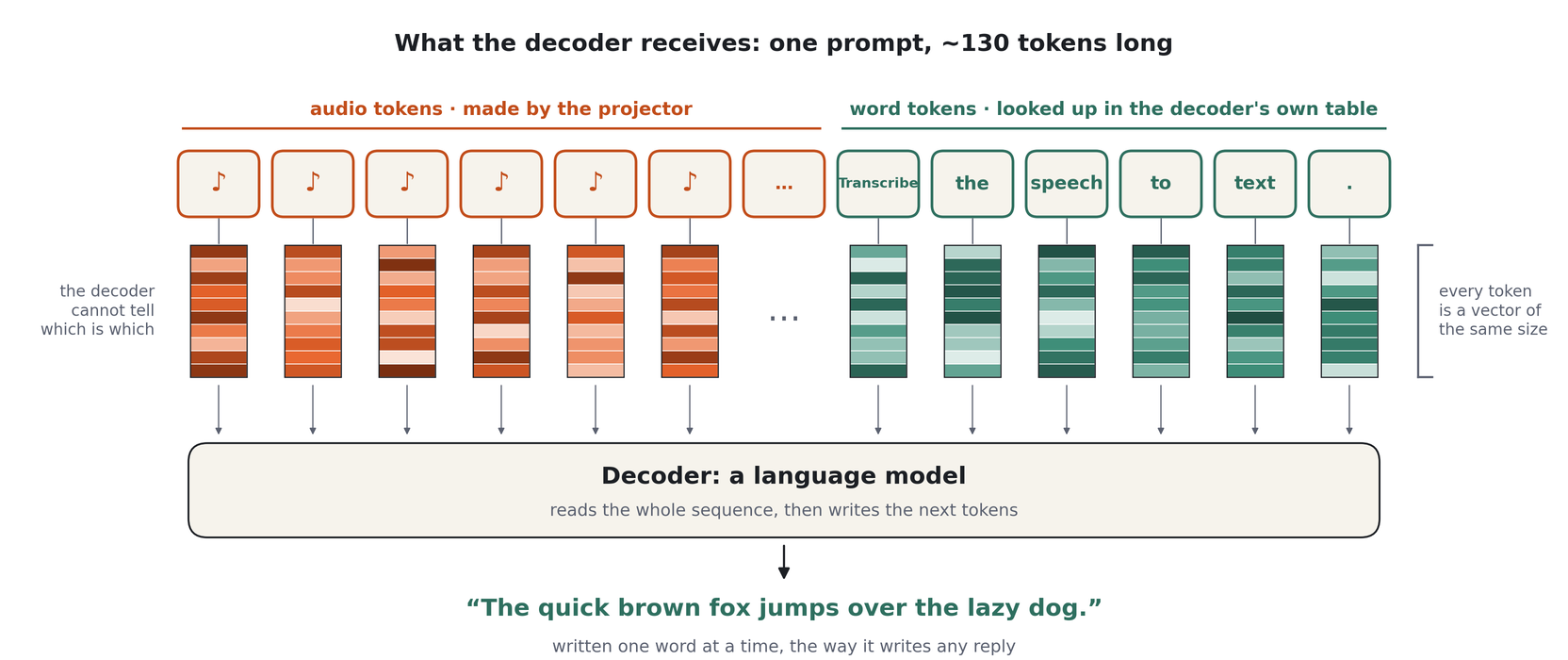
A language model never sees words either. Text is first split into tokens (a word or part of
one), and each token ID is looked up in the embedding table (embed_tokens, 248,320 rows × 2048
columns for Qwen3.5-2B). What the first layer actually receives is a row of 2048-number vectors. The
projector emits vectors of exactly that width, so audio tokens slot into the same row as word
tokens, and the decoder has no way to tell them apart.
The decoder never sees a spectrogram. It sees a normal chat conversation whose user turn contains placeholder tokens:
<|im_start|>user
<audio><audio><audio> ... (125 of them) ... Transcribe the speech to text<|im_end|>
<|im_start|>assistant
The quick brown fox jumps over the lazy dog.<|im_end|>
Before the decoder runs, the model swaps each <audio> placeholder's embedding for one row of the
projector's output. From the decoder's point of view it is completing a chat where the user pasted
125 unusual words and asked for a transcript: about 130 tokens in a row, of which only the last
handful happen to be text. It answers one token at a time, the way it answers any request, with the
spelling, punctuation, and grammar it already knows. Training loss is computed only on the assistant
turn.
This is why the chat template matters: Qwen3.5 ships with one, and the training collator depends on it.
Part B: Hands-On (40 min)
Exercise 1: Environment Setup (15 min)
Create accounts (if you haven't yet):
| Account | URL | Purpose |
|---|---|---|
| GitHub | github.com | Code |
| Hugging Face | huggingface.co | Models and demos |
| Weights & Biases | wandb.ai | Training curves (Class 2) |
Install:
# Prerequisites: the project requires Python 3.12 exactly
python3.12 --version
git --version

# Clone the repo
git clone https://github.com/alexkroman/tiny-audio.git
cd tiny-audio

# Install Poetry (macOS)
brew install poetry

# Or with pip (any platform)
pip install poetry

# Install dependencies (several GB: PyTorch, transformers, gradio, ...)
poetry install

# Verify
poetry run python -c "import torch; print(f'PyTorch {torch.__version__}')"
poetry run ta --help
Log in to Hugging Face so downloads and later uploads work:
(Older installs call this huggingface-cli login.) Alternatively export HF_TOKEN in your shell.
If Python 3.12 is missing, install it with pyenv install 3.12 or brew install python@3.12 and
run poetry env use python3.12 before poetry install.
Exercise 2: Run Inference (15 min)
Launch the demo:
Open http://localhost:7860. Record yourself or upload a file. The first run downloads about 6 GB (the model plus the encoder's repo) and takes a minute to load.
Run from Python:
from transformers import pipeline

pipe = pipeline(
    "automatic-speech-recognition", model="mazesmazes/tiny-audio", trust_remote_code=True
)
result = pipe("path/to/audio.wav")
print(result["text"])

# Word-level timestamps
result = pipe("path/to/audio.wav", return_timestamps=True)
print(result["words"])
trust_remote_code=True is required because the model's architecture lives in the repo's own Python
files (asr_modeling.py, projectors.py, ...), which are published alongside the weights.
Run a small evaluation:
This downloads 20 clips from the LoquaciousSet test split, transcribes them, and prints the reference and prediction for each along with its Word Error Rate (WER). Lower is better. Class 3 covers this in depth.
Exercise 3: Explore the CLI (10 min)
The ta command (short for tiny-audio) groups every tool in the repo:
poetry run ta --help            # all command groups
poetry run ta eval --help       # evaluation options
poetry run ta runpod --help     # cloud training (Class 2)
poetry run ta dev --help        # lint, test, format
Try:
# Which datasets can you evaluate on? Read the help text for -d
poetry run ta eval --help

# Run the test suite (a couple of minutes)
poetry run ta dev test
Understanding the Code
Key Files
| File | Purpose |
|---|---|
tiny_audio/asr_modeling.py |
ASRModel: loads the encoder and decoder, builds the projector, runs forward and generate |
tiny_audio/projectors.py |
MLPAudioProjector and the frame-stacking helpers |
tiny_audio/asr_config.py |
ASRConfig: every model setting, with defaults |
tiny_audio/asr_processing.py |
ASRProcessor: feature extractor plus tokenizer |
tiny_audio/asr_pipeline.py |
The transformers pipeline used for inference |
scripts/train.py |
Training entry point: dataset loading, label normalization, and the trainer |
scripts/train_collator.py |
The data collator: chat messages, loss masking, and label filtering |
scripts/eval/ |
Dataset registry and evaluators (local models and commercial APIs) |
configs/ |
Hydra configuration |
Worth reading in this order: the MLPAudioProjector class, then ASRModel.forward, then
DataCollator._make_messages in scripts/train_collator.py.
Configuration System
Training is configured with Hydra. The main file is configs/config.yaml, and
on its own it is the full recipe: no experiment preset is needed. You can override any single value
on the command line with key=value syntax (not --key value), or put a set of overrides in your
own configs/experiments/<name>.yaml and add +experiments=<name> (Class 2 does this):
# Run the default recipe
poetry run python scripts/train.py

# Same recipe, different projector width
poetry run python scripts/train.py model.projector_hidden_dim=2048
configs/
├── config.yaml               # Model defaults: Granite Speech encoder, Qwen3.5-2B + LoRA, MLP projector
├── training/production.yaml  # Trainer defaults: LRs, batch size, schedule, checkpointing
└── data/
    ├── multiasr.yaml         # Production mix: 10 corpora, ~3M clips
    ├── librispeech_dev.yaml  # LibriSpeech dev-clean, 5.4 hours, for the free run
    └── librispeech_dummy.yaml  # 73 clips, for quick pipeline checks
One experiment preset ships: configs/experiments/tiny.yaml, the free laptop run
(ta train asr -e tiny). Presets you write go next to it.
The comments in these YAML files are unusually detailed. They record why each value is what it is
and which experiment changed it. Read configs/config.yaml and configs/training/production.yaml
before Class 2.
Troubleshooting
| Problem | Solution |
|---|---|
poetry install fails on Python version |
The project needs 3.12. Install it, then poetry env use python3.12 |
poetry install hangs |
poetry install -vvv for verbose output |
| Model download fails | Check HF_TOKEN, or run poetry run hf auth login |
| Port 7860 in use | poetry run ta demo --port 7861 |
| Import errors | Run poetry install again |
| Slow inference on a laptop | Normal on CPU. Apple Silicon uses MPS automatically |
flash_attention_2 warning |
Expected off CUDA. The model falls back to SDPA attention |
Key Takeaways
- Two skills, two parts: the encoder is the ear, the decoder is the language expert. Most errors are a hearing mistake or a language mistake, and each lives in one part.
- Architecture: frozen encoder, projector trained from scratch, frozen decoder with LoRA adapters.
- Weights stay, vectors flow: parameter count measures the grids of weights, not the width of the vectors passing through them.
- Shapes: 12.5 encoder frames/s at 1024 dims become 12.5 audio tokens/s at 2048 dims.
- The trick: the decoder sees a chat whose user turn is audio tokens plus a prompt.
- Tools: the
taCLI wraps evaluation, analysis, training, and deployment.
Before Class 2
You should leave this class with:
-
poetry run ta --helpworking - The demo transcribing your voice
- A 20-sample eval run finished (it warms the dataset cache too)
To prepare:
- Read the comment blocks in
configs/config.yamlandconfigs/training/production.yaml - Create a RunPod account and add credit for a few GPU-hours
- Create a Hugging Face write token (Settings → Access Tokens); Class 2 pushes checkpoints to your account
- Decide which budget tier from the course overview you'll run