Class 2: Training
Time: 1 hour of class time (20 min lecture + 40 min hands-on), then the run continues on its own
Goal: Size a cloud GPU, write your own experiment config, and launch a real training run.
Before you start. You need the install from Class 1, a Hugging Face write token, a W&B account, and a RunPod account with credit. Have
configs/config.yamlandconfigs/training/production.yamlopen; together they are the default recipe the lecture refers to.
Part A: Lecture (20 min)
What scripts/train.py Does
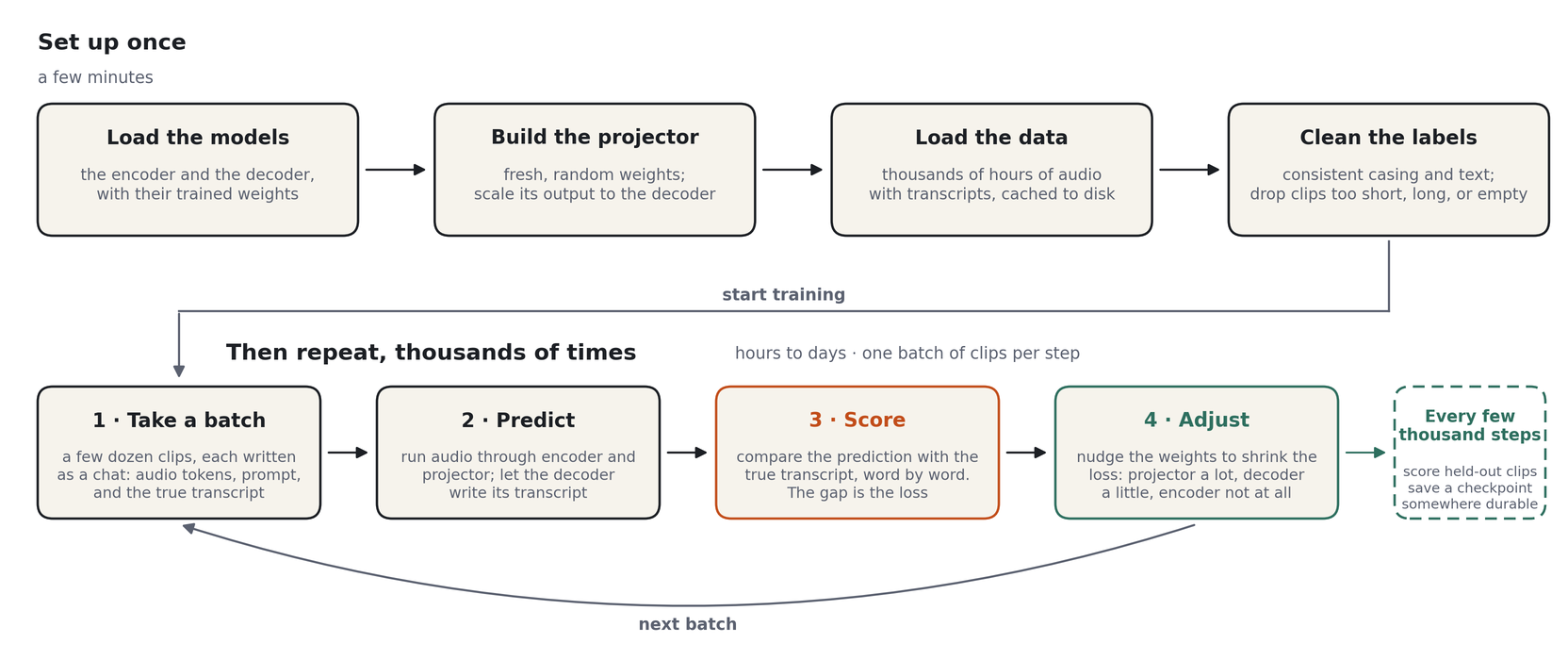
Every run has the same two parts, whether it's an afternoon on one rented GPU or weeks on hundreds: set up once, then loop. Each pass through the loop takes a batch of clips, lets the model predict their transcripts, boils the gap between prediction and truth down to one number (the loss, a penalty score that's near zero for a perfect transcript), and nudges the weights to lower it: the projector a lot, the decoder's LoRA adapters a little, the encoder and the decoder's own weights not at all. In detail:
- Loads the two pretrained models from the Hub: the Granite Speech encoder and Qwen3.5-2B. Both
are frozen, so their weights are stored in bfloat16 (
model_dtype: bfloat16). The parts that train, the projector (projector_dtype: float32) and the LoRA adapters, keep float32 weights so tiny updates aren't rounded away; compute runs in bfloat16. - Builds a fresh projector, calibrates its output scale against the decoder's embedding table,
and wraps the decoder's linear layers with LoRA adapters (rank 64, alpha 64,
all-linear). - Loads the datasets listed in the data config. This is a normal
load_dataset()in map mode, not streaming: everything is downloaded and cached to disk, anddatasetskeeps two copies (the Hub download plus its own Arrow tables). Budget about twice the download size. - Normalizes labels. Corpora that ship all-lowercase or all-uppercase transcripts are re-cased with a statistical truecaser so the decoder sees one consistent format. Unicode is cleaned up. Clips shorter than 0.8 s or longer than 19 s are dropped, as are rows whose label normalizes to nothing.
- Collates batches into chat-template conversations (see Class 1): audio placeholders plus a prompt in the user turn, the transcript in the assistant turn. Loss is computed on the assistant turn only.
- Trains with the Hugging Face
Trainerand AdamW. Three parameter groups get three learning rates: projector 1e-3, decoder (the LoRA adapters) 1e-4, encoder none (frozen). 1,000 warmup steps, then a cosine decay to zero, gradient clipping at 1.0, bf16. - Evaluates and checkpoints every 2,000 steps. With
push_to_hub: trueevery checkpoint is uploaded to your Hub repo as it is saved, so you can evaluate mid-run from any machine.
Data: Make the Labels Agree
The loop is simple. What makes or breaks a run is what you feed it, and two things matter.
The mix. A model trained only on audiobooks falls apart in a meeting. Combine read and
spontaneous speech, clean and noisy recordings, and many accents, weighted toward where the model
will be used. That is why the production recipe trains on multiasr, a blend of 10 corpora, and why
the smaller single-corpus run you launch in this class will be weaker on some domains than others.
Consistency. Every corpus writes its transcripts differently, and a model trained on all of them unchanged learns all of their habits: its output flickers between styles at random. Step 4 above picks one style and makes every label match it:
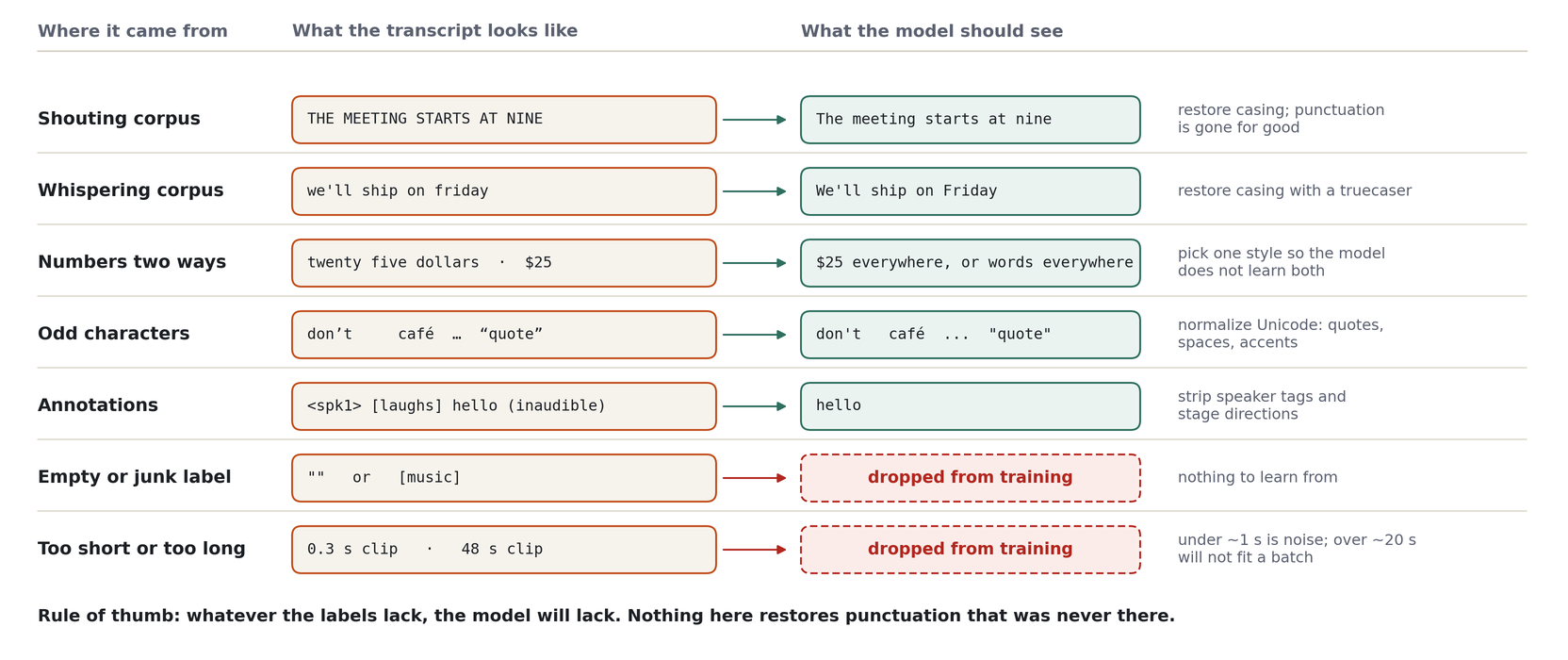
(In the code the exact length limits are 0.8 s and 19 s.)
One rule of thumb: whatever the labels lack, the model will lack. A truecaser can put capital letters back, but punctuation nobody wrote down is gone for good. If you want the model to punctuate, some of its training data must be punctuated. And always keep held-out clips the model never trains on; that is the only honest test, and it is what the eval loss below measures.
Key Metrics
| Metric | W&B name | What to look for |
|---|---|---|
| Training loss | train/loss |
Cross-entropy on the assistant turn. Falls fast, then slowly |
| Eval loss | train/eval_loss or eval/loss |
Same quantity on held-out clips. Should track training loss |
| Gradient norm | train/grad_norm |
Settles after warmup; the default clips at 1.0 |
| Learning rate | train/learning_rate |
Ramps up over warmup, then decays along a cosine |
Signs of trouble:
- Training loss flat after a few hundred steps: learning rate too low, or the data isn't reaching the model (check label normalization output).
- Eval loss rising while training loss falls: overfitting. Shorten the run or add data.
- Gradient norm spiking above 100: instability. Check for bad samples or lower the LR.
NaN: one corrupt clip is enough. The collator filters the common cases; if it happens, find the batch.
What Convergence Looks Like
The projector starts as random noise, so early on the decoder receives garbage and the loss is high. The curve below was recorded on the earlier GLM-ASR + Qwen3-0.6B recipe (a full decoder fine-tune) on the production mix; the default Granite + Qwen3.5-2B + LoRA recipe has not been charted step by step here, so treat the numbers as the expected shape rather than targets:
- Steps 0 to ~500: loss falls from ~3.5 to under 1.0 as the projector finds the basic audio-token-to-word mapping. Transcripts go from gibberish to recognizable within this window.
- Steps ~500 to ~1,500: loss settles toward ~0.4 and the gradient norm stabilizes.
- After that: slow, steady improvement for the rest of the run, as the decoder side (full fine-tune there, LoRA adapters in the default) does most of the work.
Earlier versions of this course described a "cliff" around step 1,500 where the model suddenly started working. That was a projector-only recipe. Once the decoder side trains too, the transition comes much earlier and is less abrupt. On a smaller dataset with a smaller batch, expect the same shape stretched or compressed along the step axis.
The Recipe
There is one recipe, and it is the default: configs/config.yaml plus
configs/training/production.yaml. No experiment presets ship in the repo.
| Encoder | Decoder | What trains | Data |
|---|---|---|---|
| Granite Speech 470M (frozen) | Qwen3-0.6B | Projector + full decoder (~0.6B) | multiasr |
Every variant is the same code with different freeze flags and model IDs. The flags:
| Flag | Default | Meaning |
|---|---|---|
training.freeze_audio_encoder |
true |
Encoder weights never change |
training.freeze_language_model |
false |
true freezes the decoder base (pair with LoRA) |
training.freeze_text_embed_tokens |
false |
true keeps the decoder's embedding table fixed (protects rare tokens) |
training.freeze_projector |
false |
Set true to train LoRA adapters alone |
model.use_lora |
false |
LoRA adapters on the decoder (training.use_lora overrides this) |
The default fully fine-tunes Qwen3-0.6B: every decoder weight trains, embeddings included, at a
learning rate 50x below the projector's. Its weights are stored in float32 (model.model_dtype) so
small updates aren't rounded away; compute still runs in bf16.
LoRA (Low-Rank Adaptation) is the alternative for bigger decoders: it adds small trainable matrices next to the decoder's linear layers and leaves the original weights untouched. The published model put rank-64 adapters on every linear layer of Qwen3.5-2B (~67M trainable parameters instead of ~1.9B). Both alternatives are one override away:
# Projector only: decoder fully frozen, no adapters
poetry run python scripts/train.py training.freeze_language_model=true training.freeze_text_embed_tokens=true

# LoRA on a frozen decoder instead of the full fine-tune (bf16 storage is fine for a frozen base)
poetry run python scripts/train.py model.use_lora=true model.model_dtype=bfloat16 \
    training.freeze_language_model=true training.freeze_text_embed_tokens=true \
    training.decoder_learning_rate=1e-4 training.weight_decay=0.0
Part B: Hands-On (40 min)
The course run uses the default 2B decoder, sized for one 80 GB GPU, so it trains on a rented GPU. Exercises 1 and 2 (sizing and writing your config) still run on your laptop, and so does Exercise 0: a free rehearsal of the whole loop before you spend anything.
Exercise 0: The Free Run (optional, ~30 min unattended)
configs/experiments/tiny.yaml is the default recipe with the smaller Qwen3.5-0.8B decoder, trained
on LibriSpeech dev-clean (5.4 hours, a ~340 MB download). It peaks at 8-10 GB of GPU memory, so it
runs on a 16 GB Apple Silicon Mac or any CUDA GPU, including a free Colab T4. Nothing leaves your
machine: no W&B, no Hub, no RunPod.
Watch the loss in the log. It sits near 4 while the projector's output is still noise to the decoder, then drops below 1 somewhere around step 400-650 as the decoder starts reading the audio. That drop is the moment the encoder and the decoder start talking to each other; the cloud run below shows the same curve on far more data. When it finishes, read what it learned:
Expect about 16% WER, with mistakes like "furnishings" for "furniture". Start it before Exercise 1 and it trains while you work through the rest of the class.
Exercise 1: Size Your Cloud Run (5 min)
Never guess at GPU size. ta runpod plan reads a config, measures the parameter counts and download
sizes from the Hub without downloading weights, and reports the VRAM and disk you need:
With no --experiment, it sizes the default config. Read the output: it will tell you that
multiasr is over a terabyte on disk and that Qwen3.5-2B with LoRA at batch 64 wants an 80 GB GPU.
That's the production-scale recipe, on the full data mix. It is not the run you'll do in class; your
run keeps the model and trainer settings and swaps in a much smaller dataset.
Exercise 2: Write Your Experiment (10 min)
You'll train on LoquaciousSet small: 250 hours, ~107K clips, 23 GB of parquet (about 50 GB on disk
after caching). It is a balanced mix of read and spontaneous, clean and noisy English, and its
test split is the default ta eval benchmark, so you can score your model fairly afterward.
Data config. Create configs/data/loquacious_small.yaml (it is not in the repo) with this
content:
# LoquaciousSet `small`: 250 h / 107K clips, 22.9 GB of parquet.
datasets:
  - path: speechbrain/LoquaciousSet
    name: small
    audio_column: wav        # this repo stores audio in a column called `wav`
    text_column: text
    task: transcribe
    train_splits: [train]
    eval_splits: [dev]       # `test` is reserved for `ta eval`

sample_rate: 16000
dataset_cache_dir: ${hydra:runtime.cwd}/datasets_cache
max_eval_samples_per_dataset: 200
Experiment config. Create configs/experiments/my_run.yaml (the repo ships no experiment
presets, so this directory may not exist yet) with this content:
# @package _global_
defaults:
  - override /data: loquacious_small

training:
  hub_model_id: "your-username/tiny-audio-yourname"   # CHANGE THIS
  wandb_project: tiny-audio-course
  warmup_steps: 300   # the default 1000 would be half of this short run
  eval_steps: 500
  save_steps: 500
Everything you don't override comes from configs/config.yaml and
configs/training/production.yaml: the frozen Granite Speech encoder, Qwen3-0.6B fully fine-tuned
in float32 storage, the two learning rates (1e-3 projector, 2e-5 decoder), two epochs, the cosine
schedule, batch 256 with no accumulation, bf16 compute, and push_to_hub: true. Two epochs of ~107K
clips at batch 256 is roughly 840 steps, so checkpoints every 500 steps give you one to compare plus
the final push.
LoquaciousSet's transcripts are uppercase without punctuation. The truecaser will restore casing, but nothing restores punctuation, so expect your model's output to be lightly punctuated. WER is unaffected because the scorer strips punctuation from both sides.
Now size your run:
Note the recommended GPU and the disk figure. Both go into the next step.
Exercise 3: Set Up RunPod (10 min)
-
Sign up at runpod.io and add credit.
-
Add your SSH key under Settings → SSH Public Keys:
-
Deploy a pod:
-
GPU: what
ta runpod planrecommended. The default is a batch of 256 clips, sized for a 96 GB card. On a smaller card, lowertraining.per_device_train_batch_sizeand raisetraining.gradient_accumulation_stepsto keep the effective batch at 256, and re-runta runpod planwith those overrides to check the fit - Template: RunPod PyTorch (the code expects the image's CUDA-enabled PyTorch)
-
Container disk: at least the disk figure from the plan, with headroom
-
Once it's running, copy the SSH host and port from the pod's Connect panel.
Optional shortcut: if you install runpodctl and set your RunPod API key,
ta runpod up --experiment my_run sizes the config and creates the pod for you, and
ta runpod wait <pod-id> prints the host and port once SSH is up. Try --dry-run first.
Deploy your code (rsyncs the repo and installs dependencies, 5-10 minutes):
Re-run with --skip-setup --skip-deps after local edits to sync only the files.
Exercise 4: Train (5 min to launch)
export HF_TOKEN='hf_...'        # a WRITE token: checkpoints are pushed to your Hub repo
poetry run ta runpod train <HOST> <PORT> --experiment my_run
This starts training inside a tmux session on the pod and attaches you to it. The trainer reports
to Weights & Biases by default. If the pod isn't logged in, wandb will prompt in the terminal:
choose "use an existing account" and paste the key from
wandb.ai/authorize. To skip W&B entirely, append
training.report_to=none to the command above.
Hydra overrides pass straight through, so you can adjust without editing the file:
poetry run ta runpod train <HOST> <PORT> --experiment my_run \
    training.per_device_train_batch_size=32 training.gradient_accumulation_steps=2
Detach with Ctrl+B then D. The run keeps going. Reattach later:
poetry run ta runpod attach <HOST> <PORT>
poetry run ta runpod attach <HOST> <PORT> --logs --lines 200   # just print recent output
poetry run ta runpod checkpoint <HOST> <PORT>              # path of the newest checkpoint
Monitor in W&B. Within the first few hundred steps train/loss should fall steeply (see
What Convergence Looks Like). With eval_steps: 500, the first eval
loss arrives at step 500.
When to stop early (Ctrl+C inside tmux):
- Loss hasn't moved after 500 steps
- Eval loss climbing while training loss falls
- You've seen enough and want to save money
Exercise 5: Terminate the Pod
RunPod bills by the hour whether or not the GPU is busy.
| Action | Effect |
|---|---|
| Stop | Pauses GPU billing. Disk is kept and still billed |
| Terminate | Ends all billing. Disk is deleted |
Your checkpoints are already on the Hub (push_to_hub), so there is nothing to lose by terminating.
Re-deploying takes 5-10 minutes if you want to train again.
Local Training (Optional)
The same commands work on a local CUDA GPU. The default batch is sized for an 80 GB card; on a
smaller one, trade batch size for accumulation steps and check the fit with ta runpod plan first:
# Your experiment
poetry run python scripts/train.py +experiments=my_run

# Same effective batch (64) on a smaller card
poetry run python scripts/train.py +experiments=my_run \
    training.per_device_train_batch_size=32 training.gradient_accumulation_steps=2

# Resume after an interruption
poetry run python scripts/train.py +experiments=my_run \
    training.resume_from_checkpoint=outputs/<date>/<time>/outputs/production_model/checkpoint-1000
Hydra changes into a fresh outputs/<date>/<time>/ directory for each run, so checkpoints land
under that directory rather than in the repo root.
Configuration Reference
Training (configs/training/production.yaml)
| Parameter | Default | Description |
|---|---|---|
training.learning_rate |
1e-3 |
Projector learning rate |
training.decoder_learning_rate |
2e-5 |
Decoder group (the fully fine-tuned Qwen3-0.6B), 50x lower |
training.freeze_language_model |
false |
Decoder fully fine-tuned (set true with model.use_lora=true for LoRA) |
training.num_train_epochs |
2 |
Epochs over the data config |
training.max_steps |
-1 |
Set a positive number to cap the run regardless of epochs |
training.per_device_train_batch_size |
256 |
Clips per step, sized for a 96 GB GPU |
training.per_device_eval_batch_size |
128 |
Clips per eval step |
training.gradient_accumulation_steps |
1 |
Effective batch = batch size × this (256) |
training.warmup_steps |
1000 |
Linear LR ramp before the cosine decay |
training.lr_scheduler_type |
cosine |
Decays to zero (no minimum LR) |
training.max_grad_norm |
1.0 |
Gradient clipping |
training.weight_decay |
0.01 |
Decoder weight decay (projector uses projector_weight_decay: 0.01) |
training.seed |
44 |
Seeds data order and init |
training.eval_steps / save_steps |
2000 |
Evaluate and checkpoint every N steps |
training.push_to_hub |
true |
Upload each checkpoint to hub_model_id (public by default) |
training.hub_model_id |
mazesmazes/tiny-audio-whisper-qwen |
Change this to your own repo |
training.bf16 |
true |
bf16 compute |
training.attn_implementation |
flash_attention_2 |
FlashAttention 2 (falls back to sdpa); enables padding-free packing |
Model (configs/config.yaml)
| Parameter | Default | Description |
|---|---|---|
model.audio_model_id |
ibm-granite/granite-speech-5.0-470m-turboctc-nc |
Audio encoder (frozen) |
model.text_model_id |
Qwen/Qwen3.5-2B |
Decoder |
model.projector_pool_stride |
1 |
Frame-stacking factor k (1 = no stacking) |
model.projector_hidden_dim |
4096 |
Width of the projector's hidden layer |
model.encoder_conv_layers |
[[0, 2, 2], [0, 2, 2]] |
Granite's ~4x conv subsampling, sizes <audio> |
model.model_dtype |
bfloat16 |
Storage precision of the (frozen) encoder/decoder |
model.projector_dtype |
float32 |
Projector weight precision |
model.use_lora |
true |
LoRA adapters on the decoder |
model.lora_rank / lora_alpha |
64 / 64 |
Adapter rank and scale (alpha/r = 1.0) |
model.lora_target_modules |
all-linear |
Every linear layer in the decoder |
Key Takeaways
- Training is a normal
Trainerrun with a frozen encoder, a frozen decoder carrying LoRA adapters, and two learning rates: hot for the fresh projector, cooler for the adapters. - The loop is simple; the data decides the result. Mix domains, make every transcript follow one style, and remember that whatever the labels lack, the model will lack.
- Data is downloaded and cached, not streamed. Plan disk at twice the download size.
ta runpod planreplaces guesswork about GPU and disk.- The loss falls hardest in the first 500 steps; the rest is refinement.
- Terminate the pod when you're done. Your checkpoints are already on the Hub.
Before Class 3
- Your run has pushed at least one checkpoint: check
https://huggingface.co/<hub_model_id>formodel.safetensors - You've glanced at the W&B curves and can say whether the loss dropped in the first 500 steps
- The pod is stopped or terminated (or you know exactly why it's still running)
If the run isn't finished by class time, that's fine. Class 3 works on any checkpoint that has been pushed, and falls back to the published model if you have none.